✨ react-hook-form + yup으로 Input 공통 컴포넌트 만들기
폼을 만들다 보면 매번 이런 코드가 반복된다.
label, input, 에러 메시지, focus 스타일, 빨간 border 처리, onBlur 시 검증...
페이지마다 이걸 복붙하면 👉 유지보수 지옥 시작
그래서 이번에는 react-hook-form + yup 환경에 최적화된 Input 공통 컴포넌트를 만들어봤다
1️⃣ 타입에 따라 input 분기 처리
type?: 'text' | 'password'
password일 경우에만
👉 비밀번호 보이기 / 숨기기 토글 아이콘 추가
{type === 'text' ? (
  <input ... />
) : (
  <>
    <input type={isVisibility ? 'text' : 'password'} />
    <Icon onClick={togglePasswordVisibility} />
  </>
)}
💣register 타입 에러
처음엔 이렇게 쓰려고 했다.
register: UseFormRegister
근데 계속 타입 에러가 발생했다.
🔍 왜 그럴까?
UseFormRegister는 register 함수 자체의 타입이다.
하지만 우리가 Input 컴포넌트에 넘기는 건
register('email')
👉 즉, register 함수의 반환값
✅ 해결 방법
UseFormRegisterReturn 사용
import { UseFormRegisterReturn } from 'react-hook-form';

register: UseFormRegisterReturn;
UseFormRegisterReturn은 register() 호출 시 반환되는 객체 타입이다.
이 안에는 onChange, onBlur, ref, name 등이 모두 포함되어 있고, <input {...register} /> 이렇게 직접 input에 뿌려줄 수 있다.
👉 공통 input 컴포넌트에는 이 타입이 정답
2️⃣ input 크기가 다를 때?
페이지마다 max-width가 달랐다.
- 로그인 → 640px
- 모달 → 400px
- 관리자 페이지 → full
기본값을 설정하고 필요할 때 프롭스로 내려주자.
✅ 기본값을 두고, 필요하면 props로 override
maxWidth?: string;

maxWidth = '640px'

<div style={{ maxWidth }}>
👉 공통 컴포넌트는 기본값을 가지고
👉 특수 케이스만 props로 조정
이게 가장 깔끔했다.
3️⃣ UX 개선: blur 시 진동 효과
검증 에러가 있을 때
사용자가 blur 하면 살짝 흔들리게 만들었다.
const [isVibrating, setIsVibrating] = useState(false);

const handleBlur = () => {
  if (onBlur) onBlur();
  if (!error) return;

  setIsVibrating(true);
  setTimeout(() => setIsVibrating(false), 300);
};
className={`
${isVibrating && 'animate-vibration'}
${error && 'border-red-400'}
`}
👉 단순히 빨간 border보다
👉 UX 피드백이 훨씬 명확해진다.
4️⃣ 책임 분리: PasswordInput 컴포넌트 분리
처음에는 Input 안에서 다 처리했다.
그런데 코드가 길어지기 시작했다.
- visibility state
- 아이콘 분기
- blur 처리
- 에러 처리
👉 그래서 비밀번호 전용 컴포넌트로 분리
{type === 'password' && (
  <PasswordInput
    name={name}
    register={register}
    error={error}
    onBlur={handleBlur}
  />
)}
5️⃣ Textarea도 같은 패턴으로 확장
type TextareaProps = TextareaHTMLAttributes<HTMLTextAreaElement> & {
  register: UseFormRegisterReturn;
  error?: FieldError;
};
✨최종 코드
최종 구조 ))
components/
 ├─ Input.tsx
 ├─ PasswordInput.tsx
 └─ Textarea.tsx
최종 코드 ))
- input 컴포넌트
import React, { useState } from 'react';
import { FieldError, UseFormRegisterReturn } from 'react-hook-form';

import PasswordInput from './PasswordInput';

type InputProps = {
  label: string;
  name: string;
  type?: 'text' | 'password' | 'number' | 'email';
  placeholder: string;
  register: UseFormRegisterReturn;
  error?: FieldError;
  maxWidth?: string;
  onBlur?: () => void;
};

export default function Input({
  label,
  name,
  type,
  placeholder,
  register,
  error,
  maxWidth = '640px',
  onBlur,
}: InputProps) {
  const [isVibrating, setIsVibrating] = useState(false);

  const handleBlur = () => {
    if (onBlur) onBlur();
    if (!error) return;
    setIsVibrating(true);
    setTimeout(() => setIsVibrating(false), 300);
  };

  return (
    <div className={`relative flex w-full flex-col gap-2`} style={{ maxWidth }}>
      <label htmlFor={name}>{label}</label>
      {(type === 'text' || type === 'number' || type === 'email') && (
        <input
          type={type}
          id={name}
          placeholder={placeholder}
          {...register}
          onBlur={handleBlur}
          className={`h-58 rounded-md border-2 px-16 outline-none focus:border-custom-green-200 ${isVibrating && 'animate-vibration'} ${error && 'border-red-400'}`}
        />
      )}
      {type === 'password' && (
        <PasswordInput
          name={name}
          placeholder={placeholder}
          register={register}
          error={error}
          onBlur={handleBlur}
        />
      )}
      {error && (
        <p className="pl-8 text-xs-regular text-custom-red-200">
          {error.message}
        </p>
      )}
    </div>
  );
}- PasswordInput 컴포넌트
import { PasswordOffIcon, PasswordOnIcon } from '@/libs/utils/Icon';
import React, { useState } from 'react';
import { FieldError, UseFormRegisterReturn } from 'react-hook-form';

type PasswordInputProps = {
  name: string;
  placeholder: string;
  register: UseFormRegisterReturn;
  error?: FieldError;
  onBlur?: () => void;
};

export default function PasswordInput({
  name,
  placeholder,
  register,
  error,
  onBlur,
}: PasswordInputProps) {
  const [isVisibilityIcon, setIsVisibilityIcon] = useState(false);
  const [isVibrating, setIsVibrating] = useState(false);

  const togglePasswordVisibility = () => {
    setIsVisibilityIcon(!isVisibilityIcon);
  };

  const handleBlur = () => {
    if (onBlur) onBlur();
    if (!error) return;
    setIsVibrating(true);
    setTimeout(() => setIsVibrating(false), 300);
  };

  return (
    <>
      <input
        type={isVisibilityIcon ? 'text' : 'password'}
        id={name}
        placeholder={placeholder}
        {...register}
        onBlur={handleBlur}
        className={`h-58 rounded-md border-2 px-16 outline-none focus:border-custom-green-200 ${isVibrating && 'animate-vibration'} ${error && 'border-red-400'}`}
      />
      {isVisibilityIcon ? (
        <PasswordOnIcon
          width={24}
          height={24}
          className="absolute right-20 top-42 cursor-pointer"
          onClick={togglePasswordVisibility}
        />
      ) : (
        <PasswordOffIcon
          width={24}
          height={24}
          className="absolute right-20 top-42 cursor-pointer"
          onClick={togglePasswordVisibility}
        />
      )}
    </>
  );
}- Textarea 컴포넌트
import React, { TextareaHTMLAttributes } from 'react';
import { FieldError, UseFormRegisterReturn } from 'react-hook-form';

type TextareaProps = TextareaHTMLAttributes<HTMLTextAreaElement> & {
  label: string;
  register: UseFormRegisterReturn;
  error?: FieldError;
  maxWidth?: string;
  height?: string;
  onBlur?: () => void;
};


export default function Textarea({
  label,
  register,
  error,
  maxWidth = '640px',
  height = '346px',
  onBlur,
  ...props
}: TextareaProps) {
  const { name, placeholder } = props;

  return (
    <div className="relative flex w-full flex-col gap-2" style={{ maxWidth }}>
      <label htmlFor={name}>{label}</label>
      <textarea
        id={name}
        placeholder={placeholder}
        {...register}
        onBlur={onBlur}
        className={`resize-none rounded-md border-2 p-16 outline-none focus:border-custom-green-200 ${error ? 'border-red-400' : ''}`}
        style={{ height }}
        {...props}
      />
      {error && (
        <p className="pl-8 text-xs-regular text-custom-red-200">
          {error.message}
        </p>
      )}
    </div>
  );
}
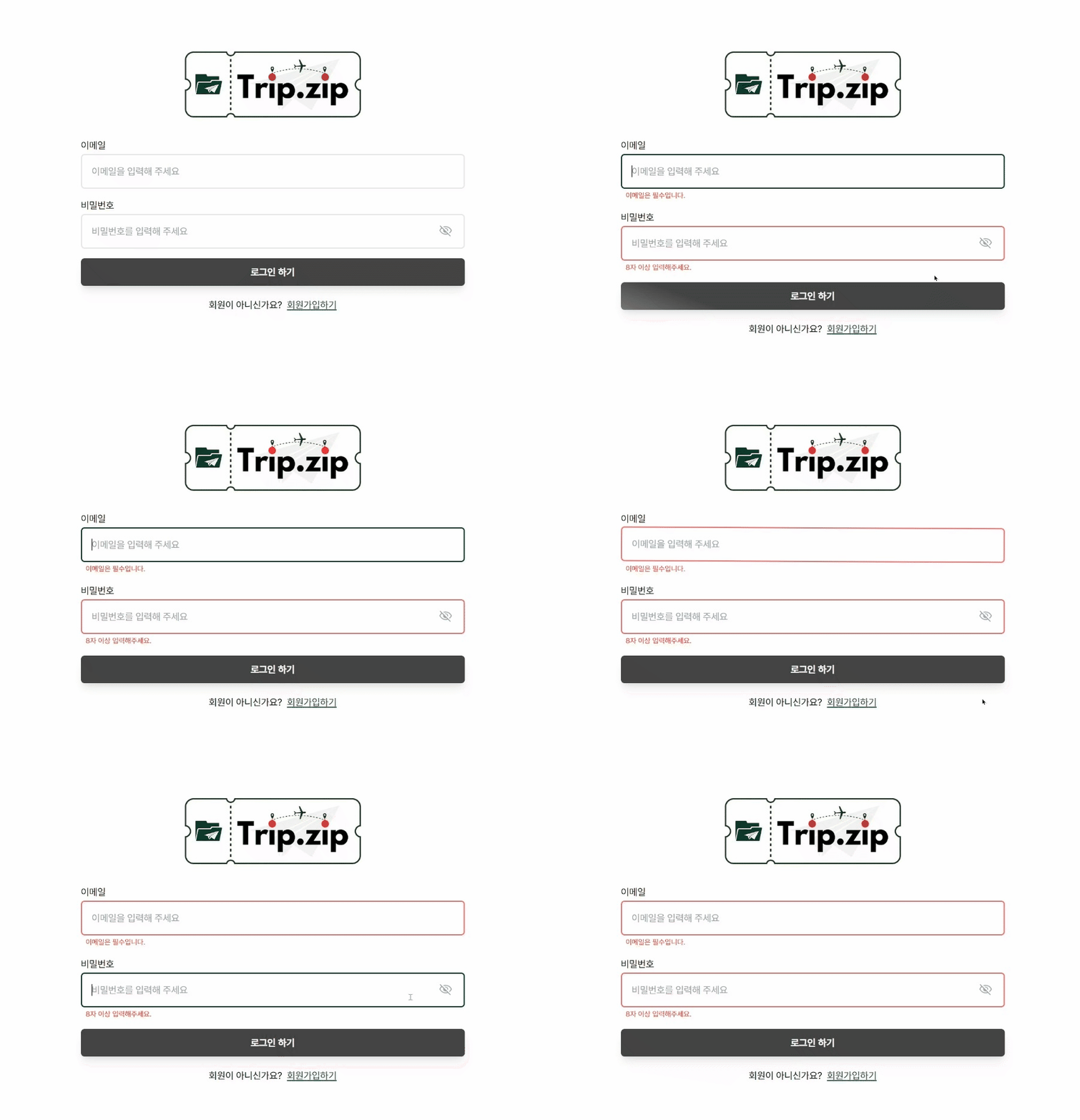
✨결과
'✨FRONTEND > 📍React' 카테고리의 다른 글
| Toast 공통 컴포넌트 만들기 (feat.react-toastify) (0) | 2024.08.08 |
|---|---|
| react-hook-form + yup = 회원가입/로그인(feat.쿠키) (0) | 2024.08.02 |
| 라이브러리 없이 state로 폼 만들기 (0) | 2024.07.31 |
| 서버 상태 💞 클라이언트 상태 (0) | 2024.07.20 |
| React Query 왜 씀? (1) | 2024.07.20 |


