🎨 shadcn/ui: 도입부터 커스텀까지
프론트엔드 개발을 하다 보면
“디자인은 통일하고 싶은데, 커스텀은 자유로웠으면 좋겠고,
라이브러리는 너무 무겁지 않았으면…” 같은 고민을 하게 된다.
이럴 때 딱 맞는 선택지가 shadcn/ui다.
1. shadcn/ui란?
https://ui.shadcn.com/docs/installation
Installation
How to install dependencies and structure your app.
ui.shadcn.com
shadcn/ui는 단순한 컴포넌트 라이브러리가 아니다.
필요한 컴포넌트의 소스 코드를 내 프로젝트로 직접 가져오는 방식의 UI 툴킷이다.
즉,
👉 node_modules에 숨겨진 컴포넌트를 쓰는 게 아니라
👉 내 코드로 복사된 컴포넌트를 직접 수정하며 사용하는 구조
🔍 핵심 특징
- 컴포넌트 소유권 = 내 프로젝트
- 디자인 시스템을 강요하지 않음
- 필요 없는 의존성 최소화
✅ 장점
- 스타일 커스텀 100% 자유
- 코드 흐름 파악이 쉬움
- 라이브러리 업데이트에 덜 휘둘림
🧱 기반 기술
- Tailwind CSS → 빠르고 일관된 스타일링
- Radix UI → 접근성(A11y)이 검증된 Headless 컴포넌트
💡 “라이브러리를 쓰는 느낌보다,
잘 만들어진 기본 컴포넌트를 상속받는 느낌에 가깝다.”
2. 설치 및 초기화 (pnpm 기준)
shadcn/ui는 CLI를 통해 프로젝트 환경을 먼저 세팅한다.
1) 초기화
터미널에서 아래 명령어를 실행한다.
pnpm dlx shadcn@latest init
초기화 과정에서 다음과 같은 설정을 선택하게 된다.
- 사용 중인 프레임워크 (Next.js / React 등)
- TypeScript 사용 여부
- Tailwind 설정 경로
- 컴포넌트 생성 위치 (
src/components/ui등)
👉 이 단계에서 프로젝트 구조에 맞게 커스터마이징할 수 있다는 점이 shadcn의 큰 장점이다.
3. 컴포넌트 추가 및 사용법
1) 필요한 것만 골라 담기
shadcn/ui는 모든 컴포넌트를 한 번에 설치하지 않는다.
필요한 컴포넌트만 그때그때 추가한다.
pnpm dlx shadcn@latest add button checkbox dialog sonner📁 생성되는 구조
설치가 완료되면 아래 경로에 컴포넌트 소스가 생성된다.
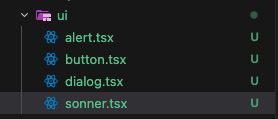
👉 이 파일들은 전부 수정 가능
👉 Tailwind 클래스 추가, props 확장, 디자인 변경 전부 자유
마지막으로 layout.tsx에 넣어주면 끝이다!
<html lang="ko">
      <body
        className={`${geistSans.variable} ${geistMono.variable} antialiased`}
      >
        <AuthProvider>
          <Header />
          <AuthGuard>
            <div className="min-h-screen">{children}</div>
          </AuthGuard>
          <Footer />

          <Toaster position="top-right" /> // 여기!!!!

        </AuthProvider>
      </body>
    </html>
아래는 예시)
토스트 관련 컴포넌트인데 내가 원하는 style을 적용했음!!

'use client'

import {
  CircleCheckIcon,
  InfoIcon,
  Loader2Icon,
  OctagonXIcon,
  TriangleAlertIcon,
} from 'lucide-react'
import { useTheme } from 'next-themes'
import { Toaster as Sonner, type ToasterProps } from 'sonner'

const Toaster = ({ ...props }: ToasterProps) => {
  const { theme = 'system' } = useTheme()

  return (
    <Sonner
      theme={theme as ToasterProps['theme']}
      className="toaster group"
      icons={{
        success: <CircleCheckIcon className="size-4 text-sky-400" />,
        info: <InfoIcon className="size-4 text-emerald-400" />,
        warning: <TriangleAlertIcon className="size-4 text-amber-400" />,
        error: <OctagonXIcon className="size-4 text-rose-400" />,
        loading: (
          <Loader2Icon className="size-4 animate-spin text-indigo-300" />
        ),
      }}
      toastOptions={{
        // style에 정의된 변수를 강제로 사용하도록 설정
        className: `
          !backdrop-blur-md
          !shadow-2xl
          !font-bold
          data-[type=error]:!bg-[var(--error-bg)]
          data-[type=error]:!text-[var(--error-text)]
          data-[type=error]:!border-[var(--error-border)]
          data-[type=success]:!bg-[var(--success-bg)]
          data-[type=success]:!text-[var(--success-text)]
          data-[type=success]:!border-[var(--success-border)]
          data-[type=warning]:!bg-[var(--warning-bg)]
          data-[type=warning]:!text-[var(--warning-text)]
          data-[type=warning]:!border-[var(--warning-border)]
          data-[type=info]:!bg-[var(--info-bg)]
          data-[type=info]:!text-[var(--info-text)]
          data-[type=info]:!border-[var(--info-border)]
        `,
      }}
      style={
        {
          '--success-bg': 'rgba(56, 189, 248, 0.1)',
          '--success-text': '#38bdf8',
          '--success-border': 'rgba(56, 189, 248, 0.35)',

          '--error-bg': 'rgba(244, 63, 94, 0.1)',
          '--error-text': '#fb7185',
          '--error-border': 'rgba(244, 63, 94, 0.35)',

          '--warning-bg': 'rgba(245, 158, 11, 0.1)',
          '--warning-text': '#fbbf24',
          '--warning-border': 'rgba(245, 158, 11, 0.35)',

          '--info-bg': 'rgba(16, 185, 129, 0.1)',
          '--info-text': '#34d399',
          '--info-border': 'rgba(16, 185, 129, 0.35)',

          '--border-radius': '1rem',
        } as React.CSSProperties
      }
      {...props}
    />
  )
}

export { Toaster }
4. shadcn/ui를 쓰면서 느낀 점
- 디자인 시스템을 강요하지 않고
- 구조만 제공하고
- 결정권은 개발자에게 남겨둔다!
'✨FRONTEND > 📍React' 카테고리의 다른 글
| Tailwind Breakpoint 기준으로 useResponsive 훅 만들기 (0) | 2026.02.26 |
|---|---|
| 패키지 관리자 비교 (0) | 2026.02.13 |
| React에서 map 쓰는 패턴 정리 (0) | 2025.12.02 |
| UI 컴포넌트 라이브러리 비교(feat. Ant Design, HeadlessUI) (2) | 2025.06.01 |
| 컴파운드 컴포넌트 + Headless UI 톺아보기 (1) | 2025.06.01 |


