
Spring Boot에서 Swagger(OpenAPI) 문서 만들기
프로젝트를 진행하다 보면 API가 늘어날수록 “이거 뭐였지?” 하는 순간이 온다.
그래서 Swagger(OpenAPI)를 붙여 API 명세를 자동화 + 테스트까지 한 번에 정리했다.
1️⃣ build.gradle 의존성(Dependency) 추가
implementation 'org.springdoc:springdoc-openapi-starter-webmvc-ui:3.0.2'
나는 springdoc-openapi를 사용했다.
Spring Boot 3.x 기준이라면 위 스타터 하나면 끝.
2️⃣ application.yml 또는 application.properties 기본 설정
springdoc.api-docs.path=/v3/api-docs
springdoc.swagger-ui.path=/swagger-ui.html
# API 그룹(select) 변경 시에도 토큰 유지 (localStorage에 저장 - 선택)
springdoc.swagger-ui.persist-authorization=true
persist-authorization을 true로 설정하면 API select 바꿔도 토큰이 유지된다. (select 만드는 방법은 아래에 있다.)
3️⃣ 인증 인터셉터 제외 처리
Swagger 경로는 인증을 타면 안 되므로 제외해준다.
// WebMvcConfig.java

@RequiredArgsConstructor
@Configuration
public class WebMvcConfig implements WebMvcConfigurer {
    private final AuthTokenInterceptor authTokenInterceptor;

    @Override
    public void addInterceptors(InterceptorRegistry registry) {
        registry.addInterceptor(authTokenInterceptor)
                .addPathPatterns("/**")
                .excludePathPatterns(
                        "/auth/login", "/auth/refresh", "/error",
                        "/swagger-ui/**", "/swagger-ui.html",
                        "/v3/api-docs", "/v3/api-docs/**");
    }
}
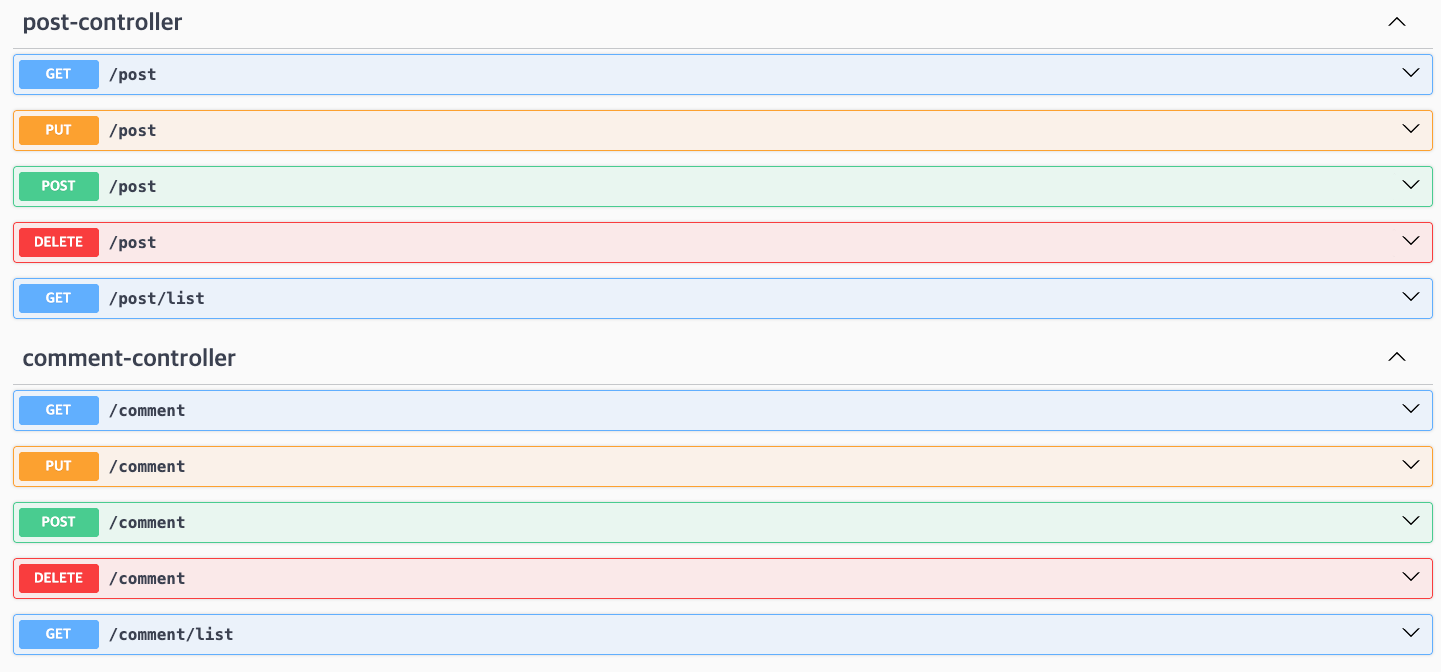
이제 접속! → 컨트롤러를 읽어 자동으로 API 문서 생성된다.
http://localhost:8080/swagger-ui/index.html#/
📌 명세 정보 커스터마이징
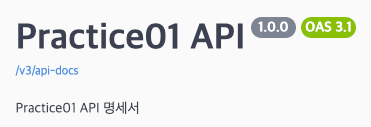
4️⃣ Swagger 제목 변경
// SwaggerConfig.java

@Configuration
public class SwaggerConfig {
    @Bean
    public OpenAPI openAPI() {
        return new OpenAPI()
                .info(new Info().title("Practice01 API")
                        .description("Practice01 API 명세서")
                        .version("1.0.0"));
    }
}
문서 상단에 표시될 기본 정보다. (전 -> 후)

📌 컨트롤러에 명세 추가하기
@Tag(name = "Post", description = "게시글 관련 API")
@RequiredArgsConstructor
@RestController
@RequestMapping("/post")
public class PostController {
    private final PostService postService;

    @Operation(summary = "게시글 작성")
    @PostMapping
    public ResponseEntity<Object> postPost(
            @AuthenticationPrincipal MemberVO auth,
            @Valid @RequestBody PostPostReq req) {
        PostEntity created = postService.postPost(auth.getUserId(), req);
        return ApiRes.success(created).created();
    }

    @Operation(summary = "게시글 수정")
    @PutMapping
    public ResponseEntity<Object> putPost(
            @AuthenticationPrincipal MemberVO auth,
            @Valid @RequestBody PutPostReq req) {
        PostEntity updated = postService.putPost(auth.getUserId(), req);
        return ApiRes.success(updated).ok();
    }

    @Operation(summary = "게시글 목록 조회", description = "게시판의 글을 최신순으로 가져옵니다. 삭제된 회원의 글은 포함되지 않습니다. page는 1 이상, size는 1 이상이어야 합니다.")
    @GetMapping("/list")
    public ResponseEntity<Object> getPostList(
            @AuthenticationPrincipal MemberVO auth,
            @Valid @ModelAttribute GetPostListReq req) {
        PageRes<GetPostListRes> PageRes = postService.getPostList(req);
        return ApiRes.success(PageRes).ok();
    }

    @Operation(summary = "게시글 상세 조회")
    @GetMapping
    public ResponseEntity<Object> getPost(
            @AuthenticationPrincipal MemberVO auth,
            @RequestParam Long postId) {
        GetPostRes post = postService.getPost(postId);
        return ApiRes.success(post).ok();
    }

    @Operation(summary = "게시글 삭제")
    @DeleteMapping
    public ResponseEntity<Object> deletePost(
            @AuthenticationPrincipal MemberVO auth,
            @RequestParam Long postId) {
        postService.deletePost(auth.getUserId(), postId);
        return ApiRes.success(null).ok();
    }
}
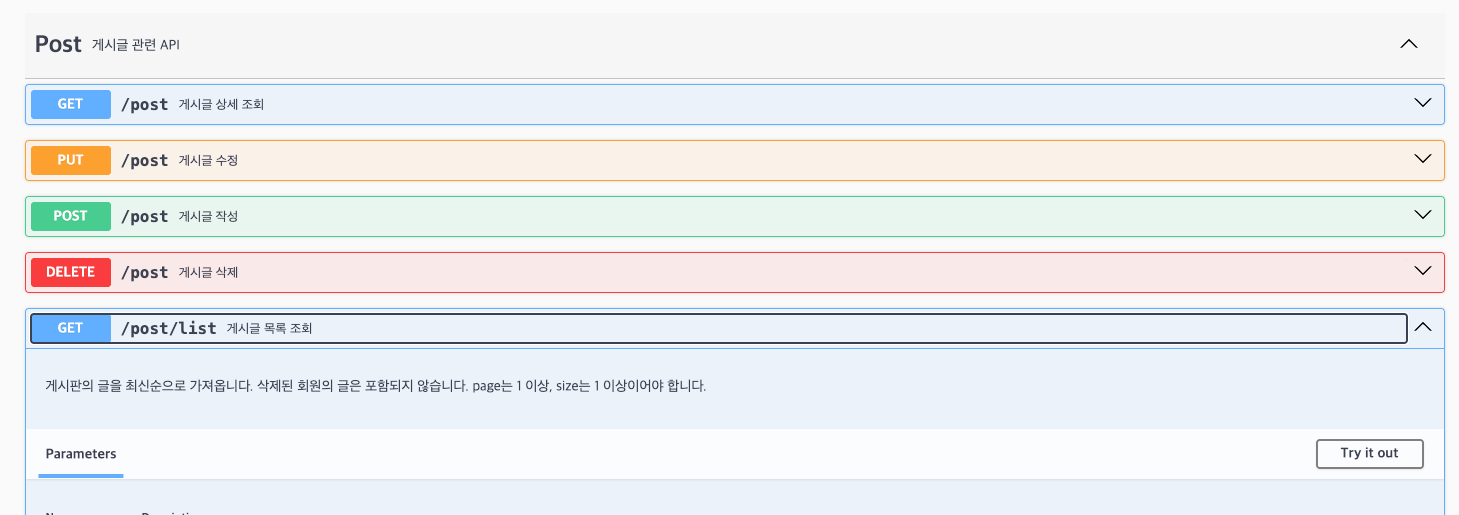
@Tag(name = "Post", description = "게시글 관련 API")- Tag로 그룹화
- Swagger UI에서 토글로 정리됨
@Operation(
  summary = "게시글 목록 조회",
  description = "최신순으로 게시글을 조회합니다."
)
📌 Request 스키마 만들기
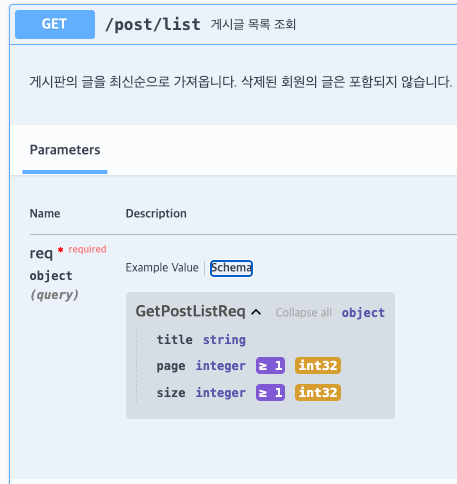
DTO에 @Schema를 붙여 설명을 추가할 수 있다.
@Schema(description = "게시글 목록 조회 요청")
public class GetPostListReq {

    @Schema(description = "제목 검색어")
    private String title;

    @Schema(description = "페이지 번호 (1 이상)", example = "1")
    @Min(1)
    private int page = 1;

    @Schema(description = "페이지 크기 (1 이상)", example = "10")
    @Min(1)
    private int size = 10;

    @Schema(hidden = true)
    public int getOffset() {
        return (page - 1) * size;
    }
}
hidden = true를 쓰면
Swagger 문서에는 노출되지 않는다.
| 속성명 | 설명 | 예시 |
|---|---|---|
summary |
API의 짧고 간결한 제목 (리스트에 바로 노출) | "게시글 목록 조회" |
description |
API에 대한 상세한 설명 (클릭 시 노출) | "페이징 처리가 포함된 게시글 전체 목록입니다." |
hidden |
해당 API를 문서에서 숨길지 여부 | true, false |
tags |
특정 태그로 그룹화 (토글로 열고 닫을 수 있음) |
📌 공통 Response 스키마 설계
나는 아래와 같이 공통 응답 규격을 맞췄다.
{
  "success": true,
  "data": {},
  "message": null
}
데이터가 있을 때 ApiResSchema<T> (공통 규격)
- 프론트엔드와 약속한 공통 응답 포맷을 유지한다.
- 제네릭
<T>를 사용하여 데이터 부분에 어떤 객체든 들어올 수 있다.
// ApiResShema.java

@Getter
@Schema(description = "API 공통 응답")
public class ApiResSchema<T> {

    @Schema(description = "성공 여부")
    private boolean success;

    @Schema(description = "응답 데이터")
    private T data;

    @Schema(description = "에러 메시지")
    private String message;
}
데이터가 없을 때 (EmptyRes) ApiResShemas
EmptyRes는data자리에 null이 들어가더라도 전체적인 상자 틀(success, data, message)을 유지해주는 역할을 한다.- 수정, 삭제처럼 돌려줄 데이터가 없는(null인) 경우에
EmptyRes를 쓴다!
public class ApiResSchemas {
    @Schema(description = "빈 데이터 응답 (삭제 등)")
    public static class EmptyRes extends ApiResSchema<Object> {}
}
프론트엔드 개발자는 이제 딱 한 가지만 확인하면 된다.
"무조건 success가 true인지만 보면 되는구나! data는 비어있을 테니 안 열어봐도 되겠네."
이제 저것을 공통으로 쓰려면 ApiRes.java 에서 ResponseEntity<ApiRes<T>> 를 써주면 된다.
// ApiRes.java

public record ApiRes<T>(boolean success, T data, String message) {

    public static <T> ApiRes<T> success(T data) {
        return new ApiRes<>(true, data, null);
    }

    public static <T> ApiRes<T> fail(String message) {
        return new ApiRes<>(false, null, message);
    }

    public ResponseEntity<ApiRes<T>> toResponseEntity(HttpStatus status) {
        return ResponseEntity.status(status).body(this);
    }

    public ResponseEntity<ApiRes<T>> ok() {
        return toResponseEntity(HttpStatus.OK);
    }

    public ResponseEntity<ApiRes<T>> created() {
        return toResponseEntity(HttpStatus.CREATED);
    }

    public ResponseEntity<ApiRes<T>> notFound() {
        return toResponseEntity(HttpStatus.NOT_FOUND);
    }
}
컨트롤러에서 ResponseEntity<ApiRes<PageRes<GetPostListRes>>> 이렇게 형식을 맞춰주면 끝이다.
@Operation(summary = "게시글 목록 조회", description = "게시판의 글을 최신순으로 가져옵니다. 삭제된 회원의 글은 포함되지 않습니다. page는 1 이상, size는 1 이상이어야 합니다.")
    @GetMapping("/list")
    public ResponseEntity<ApiRes<PageRes<GetPostListRes>>> getPostList(
            @AuthenticationPrincipal MemberVO auth,
            @Valid @ModelAttribute GetPostListReq req) {
        PageRes<GetPostListRes> PageRes = postService.getPostList(req);
        return ApiRes.success(PageRes).ok();
    }
@Operation(summary = "게시글 삭제")
@DeleteMapping
public ResponseEntity<ApiRes<Object>> deletePost(
@AuthenticationPrincipal MemberVO auth,
@RequestParam Long postId) {
postService.deletePost(auth.getUserId(), postId);
return ApiRes.success(null).ok();
}
이렇게 맞춰주면 Swagger 문서에서도 공통 규격이 그대로 보인다.
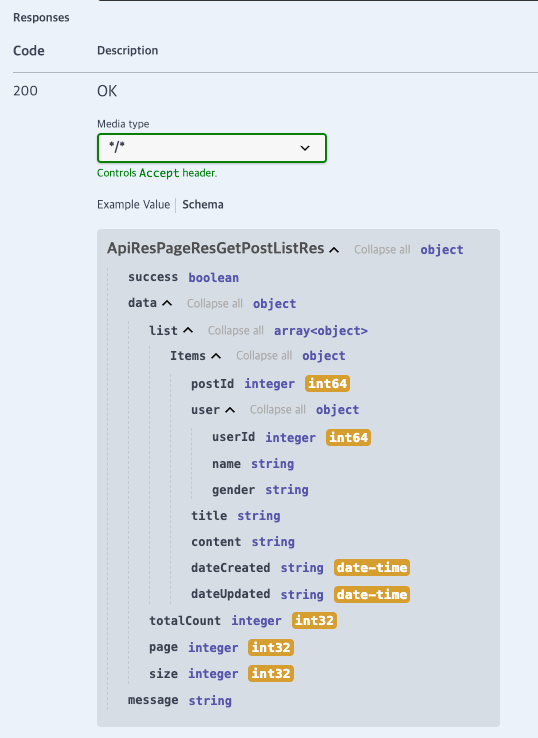
📌 API가 많을 때 (GroupedOpenApi)
스웨거에서 API를 도메인별로 깔끔하게 나눠서 보고 싶으면, GroupedOpenApi를 활용해 상단 드롭다운 메뉴를 만들어 볼 수 있다.
@Configuration
public class SwaggerConfig {
    @Bean
    public OpenAPI openAPI() {
        return new OpenAPI()
                .info(new Info().title("Practice01 API")
                        .description("Practice01 API 명세서")
                        .version("1.0.0"));
    }

    // 0. 전체 보기 그룹
    @Bean
    public GroupedOpenApi allApi() {
        return GroupedOpenApi.builder()
                .group("00. 전체보기")
                .pathsToMatch("/**")
                .build();
    }

    // 1. 게시글 페이지용 그룹
    @Bean
    public GroupedOpenApi postApi() {
        return GroupedOpenApi.builder()
                .group("01. 게시글 관리")
                .pathsToMatch("/post/**")
                .build();
    }

    // 2. 댓글 페이지용 그룹
    @Bean
    public GroupedOpenApi commentApi() {
        return GroupedOpenApi.builder()
                .group("02. 댓글 관리")
                .pathsToMatch("/comment/**")
                .build();
    }

}


📌 Swagger에서 JWT 토큰 사용하기

스웨거에서 "Try it out"을 눌러 API를 테스트할 때, 헤더에 Authorization: Bearer 이 자동으로 포함되게 하려면SwaggerConfig에 보안 설정(Security Scheme)을 추가해야 한다.
@Bean
    public OpenAPI openAPI() {

        String jwtSchemeName = "jwtAuth";
        SecurityRequirement securityRequirement = new SecurityRequirement().addList(jwtSchemeName);

        SecurityScheme securityScheme = new SecurityScheme()
                .type(SecurityScheme.Type.APIKEY)
                .in(SecurityScheme.In.HEADER)
                .name("Authorization")
                .description("Authorization 헤더에 토큰 입력 (Bearer eyJ... 또는 토큰만 입력)");

        return new OpenAPI()
                .info(new Info().title("Practice01 API")
                        .description("Practice01 API 명세서")
                        .version("1.0.0"))
                .addSecurityItem(securityRequirement)
                .components(new Components().addSecuritySchemes(jwtSchemeName, securityScheme));
    }
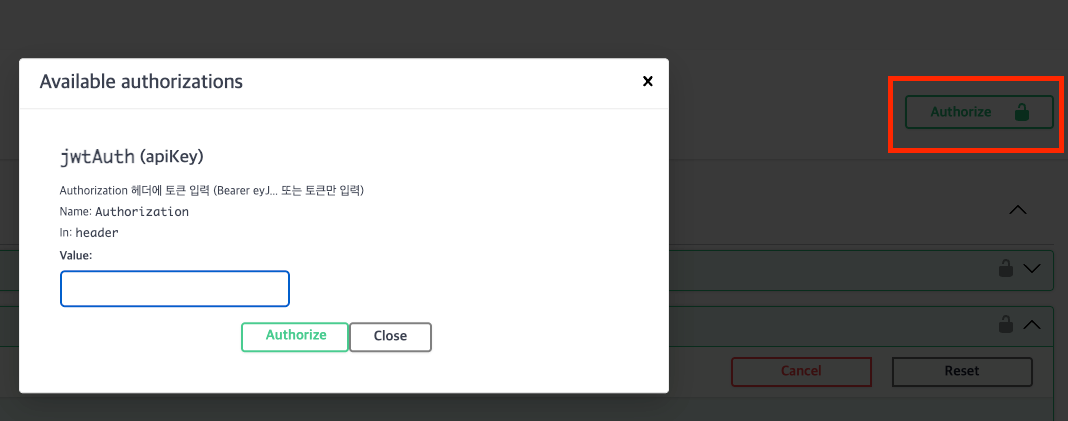

이 설정을 추가하면 우측 상단 🔒 Authorize 버튼이 생긴다.
토큰 한 번 넣어두면 모든 API 호출에 자동 포함된다. (위에서 설정한 persist-authorization을 true로 설정했기 때문!!)
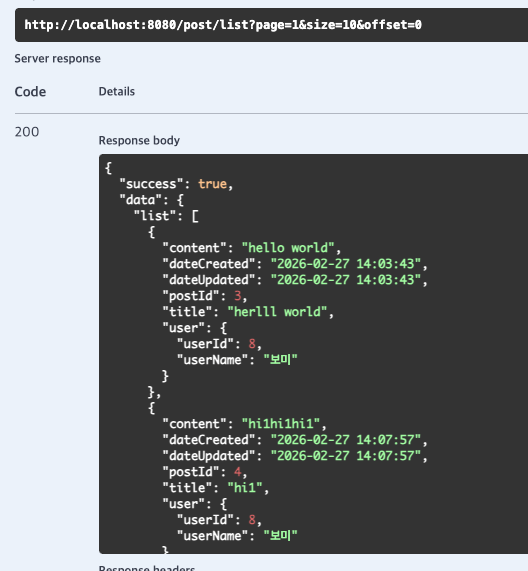
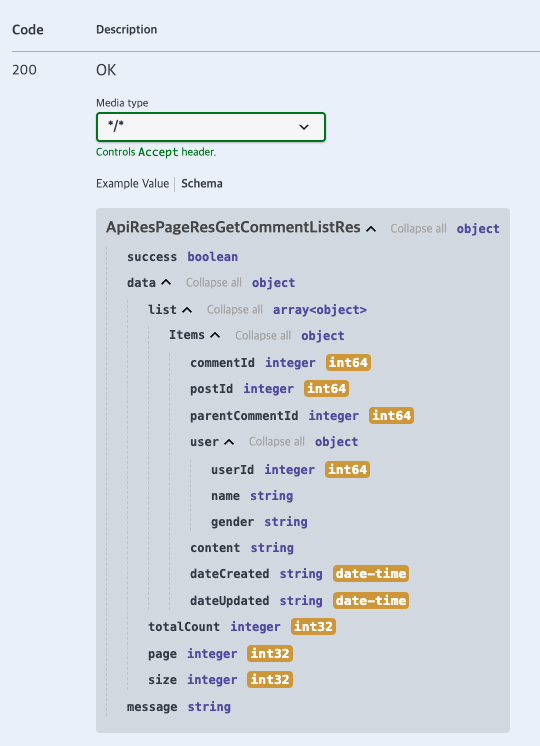
내가 설정한 설계대로 잘 나온다~~~ 🎉🎉
'✨BACKEND > 📍Java' 카테고리의 다른 글
| Spring Boot + MyBatis 게시판 페이지네이션 구현 (LIMIT, OFFSET) (1) | 2026.03.03 |
|---|
